 NoteCube한국어
Bring your context with you
Your notes can join the conversation with AI.
Use NoteCube’s MCP connection to make your recorded context useful in a compatible AI workflow.
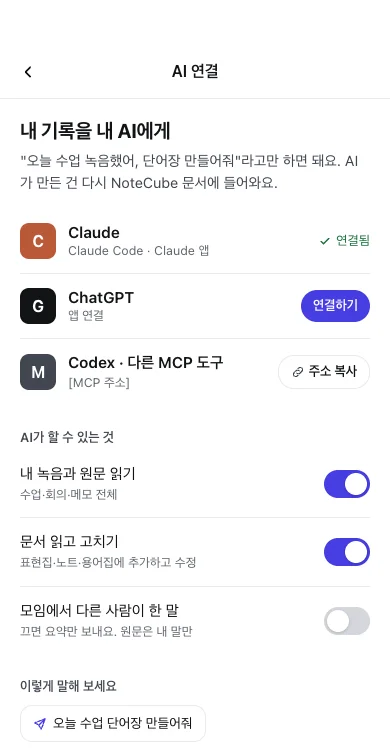
Read the context. Continue the document.
An authorized connection can retrieve transcripts and document context, and update documents within its granted permissions. App and MCP generation share the same usage limits.
Claude, ChatGPT, Codex: check your client.
MCP is a connection protocol. Availability depends on the client’s supported transport, authentication, tools and plan. Check its current setup requirements before connecting; NoteCube does not claim official certification or universal compatibility.
Choose access deliberately.
Start in NoteCube’s AI connection settings, review the available permissions, and follow the connection instructions for your client. Treat connection credentials like a password.
Only approve access you intend to grant. Review document revisions after AI edits and use available undo controls when needed.
Disconnect when you are done.
Revoke the connection in NoteCube to stop future authorized requests. Content already sent to another AI service remains subject to that service’s settings and policies; revocation does not delete its copies.